Your clients' files deserve better than email
Send, receive, exchange, and e-sign sensitive documents — all encrypted with AES-256. Your clients never need an account.
Email wasn't built for sensitive documents
Every day, businesses send confidential files over email and hope for the best. There's a better way.
Files live forever in inboxes
Every attachment you email lingers in your Sent folder, the recipient's Inbox, and on every mail server it passes through — for years. You can't unsend it. You can't recall it. You can't delete it from someone else's account. And every reply forwards another copy you'll never see.
One breached mailbox exposes everything
Compromised email accounts are the leading source of business data leaks. When an attacker gets into a single mailbox — yours, your client's, your accountant's — they walk away with every tax return, contract, ID scan, and bank statement ever attached. One stolen password, every document, gone.
Wrong tools for the job
Dropbox, Google Drive, and OneDrive are file storage — not client document exchange. They force clients to make accounts, can't auto-expire shares, leave files lying around indefinitely, and have no way to collect signatures or run a request checklist.
Phishing emails are indistinguishable
Attackers clone your firm's emails almost perfectly — same logo, same wording, same display name — and your clients have no way to tell the real email from the fake. One wrong click sends a tax return to a criminal, and the damage to your firm's reputation lands hours later.
Verify every Vukorix email is real
Every email we send carries a unique 12-character code. Anyone who receives a Vukorix email can paste that code at app.vukorix.com/verify and confirm it's genuine — in seconds, before they click a single link.
Bound at send time
Each code is generated server-side and tied to the exact recipient, sender, subject, and email type at the moment of send. An attacker can't fabricate one — and if they copy a real code into a forged email, the bound details on /verify won't match what the recipient is reading.
The URL is the trust anchor
The proof of authenticity is the HTTPS address bar — app.vukorix.com/verify — not anything inside the email. Phishers can clone our logo, our wording, even our display name. They can't replicate our domain or our SSL certificate.
Hardened against abuse
12 random characters from a confusion-free alphabet (no 0/O/1/I) make codes easy to type and computationally infeasible to guess. The /verify endpoint is rate-limited to ten checks per IP per minute, and every code expires 90 days after issue.
VKRX-XXXX-XXXX-XXXX) and check it at app.vukorix.com/verify. If the code isn't there or the bound details don't match the email you're holding, don't click anything — it's not from us.
Everything you need to stop emailing files
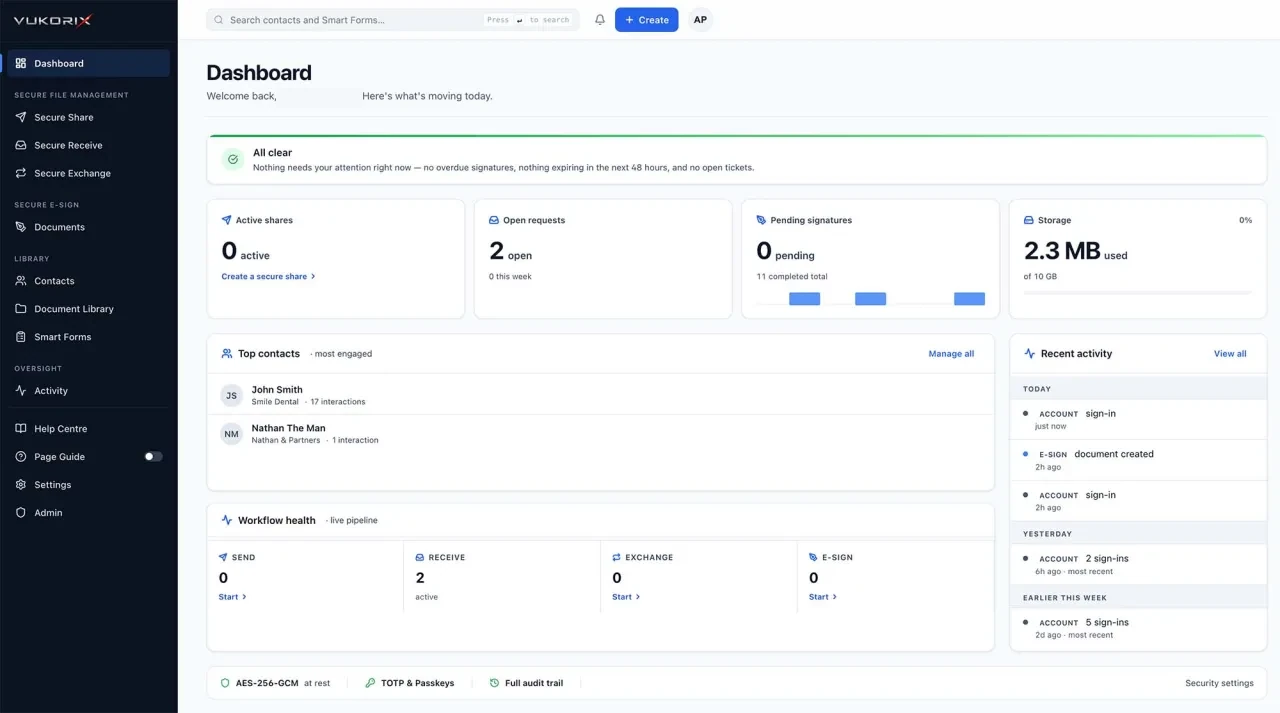
Thirteen powerful tools, one secure platform. Each designed to replace an insecure or expensive workflow.
Secure Share
Share files and encrypted messages via a unique secure link. Set passphrase protection, expiry dates, view limits, and auto-delete. Recipients never need an account.
Secure Receive
Create branded upload portals to collect files from clients. Add document checklists so clients know exactly what to provide. Track uploads in real time.
Secure Exchange
A two-way collaboration space. Send files out, request files back, add checklists, and exchange messages — all in one secure workspace. No email chains.
Sign & Return
Built into Secure Exchange. Add documents for clients to sign electronically and return — right inside the exchange. Supports multiple signers with sequential signing.
E-Sign
Standalone e-signature workflows. Upload a PDF, place fields, assign signers, and send. Track status in real time. Includes a cryptographic audit certificate.
Smart Forms
Upload any PDF and Vukorix imports its native AcroForm fields automatically — positions, types, and labels. For flat scanned PDFs without fillable fields, AI vision detects them as a fallback. Attach to a Receive or Exchange. Clients fill in online or download as an interactive PDF.
AES-256 Encryption
AES-256-GCM with a unique initialisation vector for every file. File names and contact phone numbers are encrypted at rest. Encryption keys are managed so Vukorix staff cannot read your file contents under normal operating conditions.
Custom Branding
Add your logo, brand colours, and welcome messages to client-facing portals. Your clients see your brand, not ours.
Team Management
Invite your team with role-based access — Owner, Admin, and Member. 3 team-member seats included; the owner is on the house. Add extra seats explicitly at $2.99/month each, with no surprise bills.
Contacts & Templates
Save client details for quick reuse. Create reusable checklist templates so you can spin up requests and exchanges in seconds.
Activity & Oversight
A complete audit trail for owners and admins: who did what, recipient events, team activity, and document access — with friendly activity labels. Members do not see commercial seat detail or other members' private activity.
Help Centre & AI Assistant
An in-app Help Centre plus a persistent AI assistant that walks you through workflows, with a "Show me where" guided spotlight and one-click escalation to a support ticket. The assistant guides product use only — it never reads customer documents.
Up and running in under a minute
No training required. If your client can click a link, they can use Vukorix.
Create
Set up an exchange, file request, or secure share in seconds. Add a checklist if you need specific documents.
Send the link
Your client receives a secure link via email. No account needed, no software to install.
Client acts
They upload, download, or sign documents through a branded, professional portal — from any device.
You're notified
Get instant notifications. Files are encrypted automatically, and every action is logged for your records.
Security your clients can trust
Every file is encrypted at rest with AES-256-GCM, with keys managed so Vukorix staff cannot read your file contents under normal operating conditions.
Controlled Expiry & Deletion
Files don't sit on our servers indefinitely. Set an expiry date or view limit on every share, and when the cutoff passes the encrypted file is permanently deleted — not archived, not moved to a recycle bin, just gone. Only a small metadata record of when the share existed is retained for audit purposes; the encrypted file payload and its decryption keys are destroyed. If our servers were ever compromised, attackers would find AES-256 ciphertext with no keys for files that no longer exist on disk.
AES-256-GCM Encryption
All structured data is encrypted with AES-256-GCM. Files use AES-256-CTR with HMAC-SHA256 and a unique initialisation vector per file. Even file names are encrypted at rest.
2FA & Passkey Support
TOTP-based two-factor authentication with recovery codes — compatible with Google Authenticator, Authy, and 1Password — plus passkey (WebAuthn) support for passwordless sign-in with Face ID, Touch ID, Windows Hello, or a hardware security key.
Self-Destructing Links
Set links to expire after a date or number of views. When they expire, the encrypted data is permanently deleted from the server. Not archived — deleted.
Comprehensive Audit Logging
Every action is logged — who accessed what, when, from which IP, and on what device. A complete record for compliance and peace of mind.
Security Monitoring
Continuous automated scanning — file integrity monitoring, permission auditing, intrusion detection, and SSL certificate monitoring.
Email Verification Codes
Every outgoing email includes a unique verification code. Recipients can confirm the code matches the one on the Vukorix link they are about to open — so a phishing clone of the email can never trick them into visiting a fake portal pretending to be yours.
Warden Virus Scanning
Every file uploaded to Vukorix is scanned by the built-in Warden scanner before it ever becomes downloadable. Infected files are blocked, quarantined, and both the sender and recipient are notified — you never distribute malware to a client by accident.
Automatic Expiry
Every share, request, and exchange ships with a built-in expiry date. When the cutoff passes, access is revoked instantly — no manual cleanup, no stale links sitting in client inboxes six months later waiting to be rediscovered.
Security Comparison
| Security Feature | Vukorix | Dropbox | Google Drive | OneDrive | WeTransfer | PandaDoc |
|---|---|---|---|---|---|---|
| File encryption at rest | AES-256-GCM | AES-256 | AES-256 | BitLocker | AES-256 | AES-256 |
| Unique IV per file | ✓ | ✕ | ✕ | ✕ | ✕ | ✕ |
| Auto-delete after access | ✓ | ✕ | ✕ | ✕ | ✕ | ✕ |
| Permanent deletion on expiry | ✓ | ✕ | ✕ | ✕ | ✕ | ✕ |
| Passphrase-protected links | ✓ | ✕ | ✕ | ✕ | Pro only | ✕ |
| View limits on shares | ✓ | ✕ | ✕ | ✕ | ✕ | ✕ |
| Mandatory 2FA | ✓ | Optional | Optional | Optional | ✕ | Optional |
| Argon2id passwords | ✓ | ✕ | ✕ | ✕ | ✕ | ✕ |
| Real-time security monitoring | ✓ | ✕ | ✕ | ✕ | ✕ | ✕ |
| Encrypted file names at rest | ✓ | ✕ | ✕ | ✕ | ✕ | ✕ |
| Email verification codes (anti-phishing) | ✓ | ✕ | ✕ | ✕ | ✕ | ✕ |
| Built-in virus scanning | ✓ Warden | ✕ | ✕ | Limited | ✕ | ✕ |
One plan. Everything included.
No tiers, no per-envelope fees, no surprises. Start free, upgrade when you're ready.
- Unlimited secure shares
- Unlimited file requests
- Unlimited exchanges
- Unlimited e-signatures
- 3 team seats included
- Owner on the house (no seat used)
- Extra seats $2.99/month each
- Custom branding
- AES-256 encryption & 2FA
- Contacts & templates
How We Compare
| Feature | Vukorix | Dropbox Business | Google Workspace | OneDrive Business | DocuSign | PandaDoc |
|---|---|---|---|---|---|---|
| Monthly price | $9.99/mo | $22/user/mo | $14/user/mo | $12.50/user/mo | $25–$60/mo | $19–$49/seat/mo |
| E-Signatures | ✓ Included | ✕ Add-on | ✕ | ✕ | ✓ Core | ✓ Core |
| File request portals | ✓ Included | Limited | ✕ | ✕ | ✕ | ✕ |
| Two-way exchanges | ✓ Included | ✕ | ✕ | ✕ | ✕ | ✕ |
| AES-256 encryption | AES-256-GCM, unique IV per file | AES-256 at rest | AES-256 at rest | AES-256 at rest | AES-256 at rest | AES-256 at rest |
| Auto-destruct files | ✓ Built-in | ✕ | ✕ | ✕ | N/A | ✕ |
| No recipient account | ✓ Never | Required | Required | Required | Partial | Partial |
| Team seats included | 3 seats | 1 per license | 1 per license | 1 per license | 1 per plan | 1 per seat |
| Per-envelope pricing | No limits | N/A | N/A | N/A | $1.50–$3/ea | 110/yr cap on Starter |
| Smart Forms (PDF → fillable form) | ✓ Included | ✕ | ✕ | ✕ | Manual placement | Manual placement |
| Recipient verification (PIN / SMS) | ✓ Included | ✕ | ✕ | ✕ | Add-on tier | Available |
| Manual PDF redaction (true blackout) | ✓ Included | ✕ | ✕ | ✕ | ✕ | ✕ |
| Anti-phishing verification codes | ✓ Built-in | ✕ | ✕ | ✕ | ✕ | ✕ |
Trusted across industries
From mortgage brokers to medical practices, businesses choose Vukorix to protect their clients' most sensitive documents.
Accounting
Collect tax documents securely from 200+ clients without a single email attachment. Tailored checklists per client, one link, done.
Mortgage Broking
Send loan documents for e-signature and collect ID verification — all in one exchange. No documents pass through email.
Legal
Share confidential case files through encrypted, expiring links. Get contracts signed with full legal audit trails.
Financial Advisory
Distribute quarterly reports and collect signed agreements without printing a page. Professional and secure.
Healthcare
Share patient records, X-rays, and referrals with passphrase protection and auto-destruct. Built for regulatory compliance.
Real Estate
Collect buyer ID and proof of funds via branded portals. Execute contracts of sale with Secure E-Sign — no printing or scanning.
Frequently asked questions
Do my clients need an account to use Vukorix?
How is my data encrypted?
Can I add my own branding?
What happens when a file link expires?
Is there a limit on file size or number of transfers?
Can multiple team members access the same account?
How does the free trial work?
Is Vukorix compliant with privacy regulations?
Can I use my existing PDF forms?
How do my clients know an email is really from me?
How does the email verification system stop phishing?
How do I check a verification code?
Are uploaded files virus-scanned?
What does the e-signature audit certificate include?
Do you support two-factor authentication and passkeys?
Do you have an API or integrations?
How does Smart Forms handle existing fillable PDFs?
What recipient verification methods are supported?
Does Vukorix support SMS verification?
What are team seats, and how is the owner counted?
What happens if I need more team seats?
What does the AI Help Assistant do?
Does the AI assistant read my documents?
Who can see organisation activity?
Stop emailing sensitive documents.
Start securing them.
7-day free trial. We verify your card with a small refunded charge to keep spammers out — your subscription doesn't start until day 8.