PandaDoc alternative

A fair-priced PandaDoc alternative for document workflows.

Vukorix gives small teams one clean platform to send documents for signature, collect client files, share sensitive information and manage reusable document workflows, all for one clear monthly price.

$9.99/month 3 seats included 7-day free trial No credit card

No upgrade gates for core workflows. Cancel any month from the billing page.

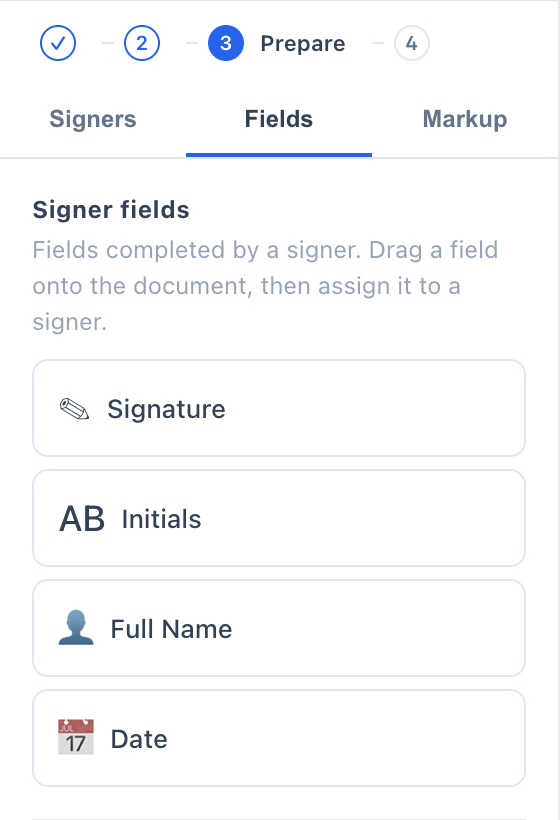
Vukorix E-Sign editor showing a PDF with signature, date and name fields placed for a signer
$9.99per month, every core workflow
3seats included as standard
7-dayfree trial, no credit card
Noupgrade gates on core workflows
Why teams choose Vukorix

A serious document workflow product at a reasonable price.

If you are comparing PandaDoc for your document workflows, Vukorix brings e-signing, secure file collection and secure sharing together in one place, on a clear monthly price. Here is what small teams get from day one.

One clean platform

Send for signature, collect client files, share sensitive documents and reuse templates, all from one dashboard.

A fair, clear price

$9.99/month with 3 seats included. The core workflows are in the plan, with no upgrade gates to unlock them.

Built for small teams

Practical document workflows for everyday business, without a heavy enterprise suite to roll out and manage.

An audit trail on every signature

Each signed document comes back as a signed PDF with a signing certificate and a full, timestamped audit trail.

Private mode for sensitive files

On supported file exchange workflows, your browser locks the file before upload, so Vukorix has no access to the contents.

Clear monthly billing

Add seats as your team grows at $2.99/month each. No annual lock-in, and you can cancel any month from the billing page.

How it works

From document to signed PDF, without the usual complexity.

Upload a PDF, set up who signs and where, then send. You get back a signed PDF and a separate audit certificate, no enterprise rollout required.

Add recipients and place the fields

Add the people who need to sign, then drag signature, date, and name fields onto the page for each one.

Vukorix E-Sign editor with signature, date and name fields placed on the PDF

Choose verification and send

Add an optional PIN or SMS check for each signer, then send. Reminders go out automatically.

Vukorix E-Sign send dialog with per-signer PIN or SMS verification and automatic reminders

The signer completes the document

Each signer opens a link and signs in their browser. There is no account to create.

Vukorix E-Sign confirmation that a signer has submitted their signature in the browser
Audit & verification

Signed PDFs come with a verifiable audit record.

Every completed document comes back as a signed PDF plus a separate audit certificate, sealed with a signing reference and a SHA-256 fingerprint of the file.

Vukorix E-Sign completed document showing signer events, timestamps, a signature certificate and a verification fingerprint

Anyone you share the signed PDF and audit pack with can re-check it later. The signing reference and SHA-256 fingerprint confirm the document is the original and has not been changed.

Vukorix verification screen where a signed PDF is checked against its signing reference and audit record
Vukorix verified result confirming the document, organisation and matching SHA-256 fingerprint

Explore each workflow: E-Sign · Secure Receive · Secure Share · Document Library · Smart Forms · Secure Exchange · Pricing

Vukorix vs PandaDoc

How Vukorix compares with PandaDoc.

Vukorix includes the core document workflows in one affordable plan. Here is how that lines up against PandaDoc.

  Vukorix PandaDoc
One affordable monthly plan $9.99/month Per-user pricing
3 seats included 3 seats Charged per user
E-signing with audit trail
Secure file sharing Separate product
Client upload portal Higher tier
Reusable document library Higher tier
Smart forms Higher tier
Secure two-way exchange Separate tools
No upgrade gates for core workflows Tiered plans

Swipe sideways to compare

included in the one Vukorix plan. not in one affordable plan (separate product, higher tier, add-on or per-user). Pricing and packaging can change. How we compare.

DocuSign, PandaDoc, Adobe, Adobe Acrobat, Adobe Acrobat Sign, Dropbox Sign, ShareFile and other third-party product names are trademarks of their respective owners. Vukorix is independent and is not affiliated with, endorsed by, or sponsored by those companies.

FAQ

Comparing Vukorix and PandaDoc.

Is Vukorix affiliated with PandaDoc?

No. Vukorix is an independent product and is not affiliated with, endorsed by, or sponsored by PandaDoc. This page is a comparison for teams evaluating document signing and workflow tools.

Can I use Vukorix to send documents for signature?

Yes. Vukorix E-Sign lets you upload a PDF, place signature fields, send it for signature to one or more people, and get back a signed PDF with an audit certificate.

Does Vukorix include secure file sharing?

Yes. Secure Share gives you an encrypted link with view limits, an expiry, and an optional PIN, password, or SMS code. In Private mode the file is locked in your browser before upload, so Vukorix has no access to the contents.

Does Vukorix include a client upload portal?

Yes. Secure Receive gives you a branded upload portal with a per-item checklist, so clients can send the documents you need without creating an account.

How much does Vukorix cost?

Vukorix is $9.99/month with 3 seats included. Extra seats are $2.99/month. There are no upgrade gates and no annual lock-in.

Do I need a credit card for the trial?

No. Every new account starts with a 7-day free trial and no credit card is required.

Who is Vukorix best suited for?

Vukorix is built for small teams that want one clean place to send, sign, collect, and share documents, with clear monthly pricing and a fair, predictable cost.

Send, sign, collect and share with Vukorix.

Start your 7-day free trial. No credit card required.